
.png)
Description
Download Astra Health – AI‑Powered Clinical Documentation Tool
Overview
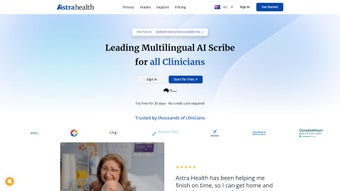
Astra Health is an innovative, AI‑driven web application that reshapes how clinicians create clinical notes. By leveraging generative AI and natural‑language processing, the platform converts spoken consultation content into accurate, structured documentation in seconds. This speed dramatically reduces the administrative load that has long plagued physicians, allowing them to focus on direct patient care rather than paperwork. In an era where clinician burnout is a critical concern, Astra Health offers a practical antidote: a secure, cloud‑based solution that automates note‑taking while preserving the nuance and precision required for high‑quality medical records. The system also supports medical scribes by delivering both the original audio and the AI‑generated transcript, expediting the review and finalization process. Additionally, Astra Health automatically creates patient‑friendly summaries that enhance communication, reinforce treatment plans, and improve health literacy. Whether you’re a solo practitioner, part of a large health system, or a freelance scribe, Astra Health delivers a seamless, time‑saving workflow that aligns with modern, patient‑centered care.
Core Features
- Real‑time Voice Capture: Record consultations directly within the browser; the AI transcribes speech instantly.
- Generative Clinical Notes: AI builds SOAP (Subjective, Objective, Assessment, Plan) notes from the transcript, adhering to industry standards.
- Patient‑Friendly Recaps: Automatic generation of lay‑person summaries that can be emailed or printed for patients.
- Scribe Collaboration Mode: Provides scribes with raw audio files and AI‑drafted notes, reducing edit time by up to 70%.
- HIPAA‑Compliant Security: End‑to‑end encryption, role‑based access, and audit logs keep patient data safe.
- Custom Template Library: Pre‑built templates for specialties such as primary care, pediatrics, cardiology, and more.
- Integrated Billing Codes: Suggests ICD‑10 and CPT codes based on documented findings, streamlining claim submission.
- Continuous Learning Engine: The AI refines its language model with each use, improving accuracy over time.
- Multi‑Device Access: Web‑based interface works on desktops, tablets, and smartphones without additional installations.
- Automatic Updates: New features and security patches are deployed server‑side, ensuring the software stays current without manual updates.
Installation, Usage & Compatibility
Because Astra Health is a cloud‑native web application, there is no traditional “install” process. Users simply navigate to astrahealth.com, create a secure account, and begin recording. The platform supports all modern browsers—including Chrome, Edge, Firefox, and Safari—so clinicians can work on any device with internet connectivity.
Step‑by‑step onboarding:
- Visit the Astra Health landing page and click “Get Started Free.”
- Complete the registration form (name, professional license, email, and organization).
- Verify your email address through the link sent by Astra Health.
- Log in and configure your profile: select specialty, upload practice logo, and set preferred note template.
- Enable microphone permissions in your browser; optionally connect a head‑set for clearer audio capture.
- Run the short “Demo Consultation” to familiarize yourself with the voice capture UI.
- Start recording real patient visits; after each session, review the AI‑generated note, make any necessary edits, and save to the electronic health record (EHR) via the secure API integration.
The platform’s operating system compatibility is extensive. It runs on:
- Windows 10/11 (any modern browser)
- macOS Ventura and later (Safari, Chrome, Firefox)
- iOS 14+ (Safari or dedicated progressive web app)
- Android 9+ (Chrome or dedicated progressive web app)
For health systems with existing EHRs, Astra Health offers RESTful API connectors to Epic, Cerner, and other major platforms. The integration is secured with OAuth 2.0, ensuring that data exchange complies with HIPAA and GDPR regulations. Users also benefit from automatic nightly backups and versioned note history, so any accidental changes can be rolled back instantly.
Pros, Cons & Frequently Asked Questions
Pros
- Drastically reduces documentation time—average note completion drops from 12 minutes to under 2 minutes.
- AI is specialty‑aware, delivering accurate medical terminology and coding suggestions.
- Secure, cloud‑based architecture eliminates the need for on‑premise maintenance.
- Patient‑friendly summaries improve adherence and satisfaction.
- Free tier available for solo practitioners and small clinics.
Cons
- Requires reliable internet connection; offline mode is not currently supported.
- Initial AI learning curve may produce minor transcription errors in heavy‑accent speech.
- Custom integration with legacy EHRs may need additional IT resources.
FAQ
Is Astra Health compliant with HIPAA and other privacy regulations?
Yes. Astra Health employs end‑to‑end encryption, role‑based access controls, and audit logging to meet HIPAA, HITECH, and GDPR standards. All data is stored on ISO‑27001‑certified servers, and the platform undergoes regular third‑party security assessments.
Can Astra Health integrate with my existing EHR system?
Astra Health provides pre‑built API connectors for major EHR vendors such as Epic, Cerner, and Allscripts. For custom solutions, the platform supports FHIR‑based integration, enabling secure bidirectional data exchange with virtually any EHR.
What happens if the AI misinterprets a spoken phrase?
The AI-generated note is always presented as a draft. Clinicians review, edit, and approve the content before saving. Over time, the system learns from corrections, reducing error rates for the specific user’s speech patterns.
Is there a free version of Astra Health?
Yes. Astra Health offers a free tier that includes up to 50 recorded consultations per month, basic note templates, and standard security features. Paid plans unlock unlimited recordings, advanced analytics, and premium integrations.
How does Astra Health handle software updates?
All updates are deployed server‑side. Users automatically receive the latest features and security patches the next time they log in—no manual downloads or installations are required.
Conclusion & Call to Action
In today’s fast‑paced medical environment, the ability to capture high‑quality clinical documentation quickly is no longer a luxury—it’s a necessity. Astra Health meets that demand with a secure, AI‑driven platform that turns spoken consultations into polished notes, patient summaries, and accurate billing codes in a matter of seconds. The solution not only frees clinicians from tedious paperwork but also contributes to lower burnout rates, better patient communication, and smoother scribe collaboration. With a free tier that lets you test the system risk‑free, plus robust integrations for larger health networks, Astra Health is positioned as a versatile tool for practices of any size.
Ready to transform your documentation workflow? Download Astra Health now and experience the future of clinical note‑taking. Take advantage of the free trial, explore the AI‑generated note capabilities, and see how much time you can reclaim for patient care. For larger organizations, contact the sales team for custom pricing and integration support. The sooner you adopt Astra Health, the faster your practice can enjoy safer, more efficient, and patient‑centered documentation.
Guides & Tutorials for Astra Health
How to install Astra Health
- Click the Preview / Download button above.
- Once redirected, accept the terms and click Install.
- Wait for the Astra Health download to finish on your device.
How to use Astra Health
This software is primarily used for its core features described above. Open the app after installation to explore its capabilities.
User Reviews for Astra Health 0
No reviews found




